
The Assignments tab lets you manage a record’s team without leaving the toolkit. Add the person taking over, staff an open role with Find Resource, or archive someone who has rolled off. Changes are picked up by the other tabs right away.
The RH Toolkit opens on the Assignments tab. Open an RH Project or Opportunity and click RH Toolkit.
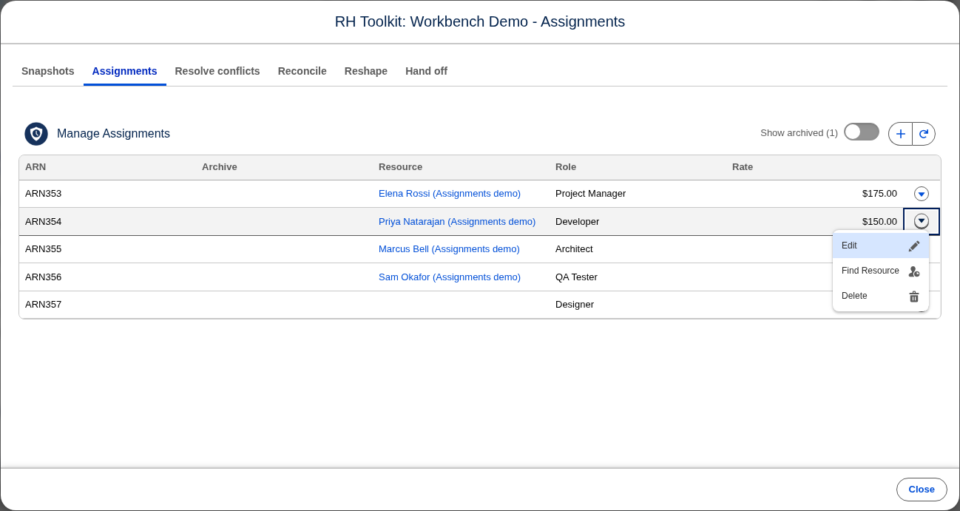
The assignment list
The list shows each assignment’s ARN (its record name), Archive, Resource, Role, and Rate. Click a resource or other linked value to open it.
Archived assignments are hidden. Turn on Show archived to list them; the toggle shows how many there are.
Change the columns
The columns come from the RH Toolkit Assignment Field Set on the Resource Assignment object. An administrator can add, remove, or reorder its fields:
- Go to Setup → Object Manager → Resource Assignment → Field Sets.
- Click RH Toolkit Assignment Field Set.
- Drag fields into or out of the field set, and into the order you want.
- Click Save.
The same fields appear in the form when you add or edit an assignment.
Add an assignment
- Click Add New Assignment.
- Fill in the fields, such as Resource, Role, and Rate.
- Click Save.
The new assignment is listed straight away, and the other tabs can use it. For example, add a placeholder assignment for an open role, then hand hours to it on the Hand off tab.
Edit an assignment
- Select Edit from the assignment’s row menu.
- Change the fields.
- Click Save.
To unarchive an assignment, turn on Show archived, edit the assignment, and clear Archive.
Find a resource for an assignment
Select Find Resource from the assignment’s row menu. Find Resource opens inside the tab, and its buttons move into the toolkit’s footer. Click Back to return to the list. See Find Resources for how to search.
Delete an assignment
Select Delete from the assignment’s row menu and confirm. The assignment’s forecasts and actuals are deleted with it.
How this differs from the Manage Assignments component
The Assignments tab edits one assignment at a time in a form, while the RH Manage Assignments component on a record page edits several rows in a grid. The tab also leaves out the Auto Forecast fields. To set an assignment’s hours, use Reshape → Set hours instead.
Who can make changes
The tab follows the same permissions as the RH Manage Assignments component:
| Action | Needs |
|---|---|
| Add | Create on Resource Assignment and edit on its lookup to this object |
| Edit | Edit on Resource Assignment |
| Find Resource | Edit on Resource Assignment and its Resource field |
| Delete | Delete on Resource Assignment |
Assignments on a record marked read-only show a padlock and cannot be changed.

