
At some point, you may need to uninstall Resource Hero from your Salesforce environment. Whether you’re moving to a different environment, cleaning up a sandbox or test environment, or, unfortunately, cancelling your subscription (it’s OK, thanks for giving us a try!), follow the steps below to back up your data and remove the application.
Before You Uninstall
Note: Uninstalling Resource Hero will permanently remove all package components and data from your org. This includes all Resource Hero custom objects and their records (to include Assignments, Forecasts, tracked time, capacity plans, etc.), as well as reports and dashboards included with the package.
Make sure to export any critical data you want to keep before proceeding with the uninstallation.
How to Uninstall Resource Hero
Follow these steps to remove Resource Hero from your Salesforce org:
- Navigate to Setup
- In the Quick Find box, type Installed Packages and select it
- In your list of installed packages, click Uninstall next to Resource Hero
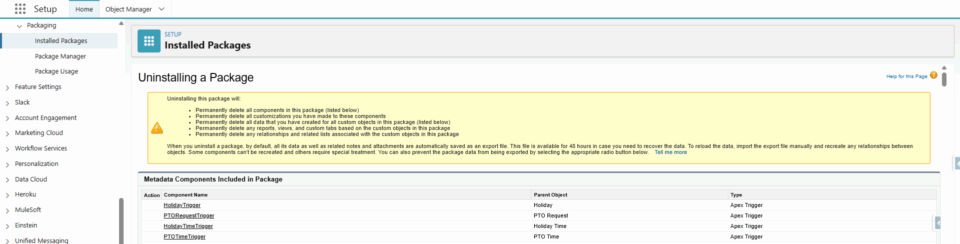
- You’ll see a confirmation page listing all components that will be removed.
- If you’d like to save a copy of the uninstall details, ensure that the Save a copy of this package’s data for 48 hours after uninstall radio button is selected.
- Check the box to confirm that Yes, I want to uninstall this package and permanently delete all associated components
- Click Uninstall
The uninstallation typically takes just a few minutes. You’ll receive an email confirmation when it’s complete.
What If Uninstall Fails?
Sometimes Salesforce prevents package uninstallation due to dependencies. This happens when other parts of your Salesforce org are still referencing Resource Hero components. Here are the most common culprits and how to resolve them:
- Field References: Delete any custom formula fields, validation rules, or automation (triggers, flow, process builder, workflow rules, etc) that reference Resource Hero object fields.
- Lightning Pages / Page Layouts: Remove Resource Hero components that you’ve added to your Lightning Pages and Page Layouts.
- Visualforce Pages: Delete any custom Legacy Visualforce Matrix that have been created.
Need Help?
If you have any questions, or would like to walk through the process together, please Contact Us, we would be happy to help.

