
Blog
Accelerated Service Delivery: How AI Speeds Up Our Salesforce Work
How AI took over the routine work in our own Salesforce org, and why a few service hours now go further than they used to.
Resource Hero is a small team. For most of our history, every hour spent administering our own Salesforce org was an hour not spent on customer requests, and every hour spent on customer requests was an hour not spent on product development.
Over the past year we changed how we work. We use Claude Code, Anthropic’s AI coding assistant, alongside our own Salesforce administration and our customer services work. It has not replaced anyone. It has made the people we have much faster, and it has changed what a block of service hours can buy.
Here is what that looks like, using real cases from the last few weeks.
Our own Salesforce org runs with an AI assistant
We run Resource Hero the way our customers run their businesses: in Salesforce. Support cases, licenses, partner orders, customer notes and billing all live in our org, and keeping them current used to be a steady drain on a small team.
Today the AI assistant handles the routine work around it:
- Cases start themselves. When a customer email comes in that needs follow-up, a case is logged with the request summarized, so nothing waits on someone remembering to create it.
- Notes stay current. After a call or a fix, the case gets a clear summary, a customer-facing comment and a resolution note, written from the actual work rather than from memory a week later.
- License changes are checked end to end. A request for three more seats touches the license record, the subscription and the Salesforce partner order. The assistant checks all three agree, builds the order and flags anything out of line before it is submitted. A mismatch that would once have surfaced on next month’s invoice gets caught the same day.
The result is that our admin time now goes to judgment calls, and the busywork mostly takes care of itself. That same approach is what we now bring to customer work.
Faster answers when something looks wrong
Most support questions start with “why does this number look off?” Answering them well means checking more than the one record in front of you.
A consulting firm noticed a project’s total actual hours didn’t match the time entries behind it. Instead of fixing that one project and hoping, we compared every project in their org: 8,257 assignments across more than 2,000 projects, checked against every rollup field on those projects, not just the one they reported. The comparison showed the field was written by one of their own rollup rules, which filtered out certain time types and had fallen behind on 13 recent projects. They got a clear answer, with numbers.
A services company asked why their people had thousands of assignments they never used. We reviewed their automations from the metadata alone, 83 flows and 20 triggers, found the one flow responsible and traced nearly 10,000 assignments back to how each batch was created, then sent them a step-by-step cleanup plan.
A customer building an Experience Cloud portal saw the RH Matrix spin forever in Experience Builder. We stood up test portals on three versions of Resource Hero to isolate the cause, confirmed it came from how Experience Builder frames the component, and showed it renders correctly in v17.
Each of these was turned around within a day.
Estimates that come in lower
The bigger change is in build work. Requests that used to be priced as projects are now priced as a few hours.
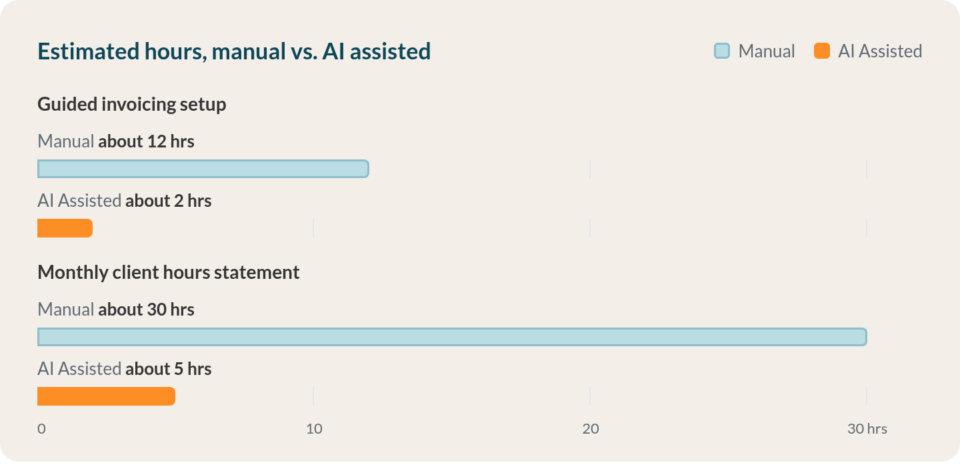
A consulting firm asked for a guided invoicing setup on their projects: a screen flow prefilled from the opportunity, required billing fields before a project goes active, a Finance report and billing notifications. Built manually, we would estimate about 12 hours. With AI-assisted development, it is closer to 2.
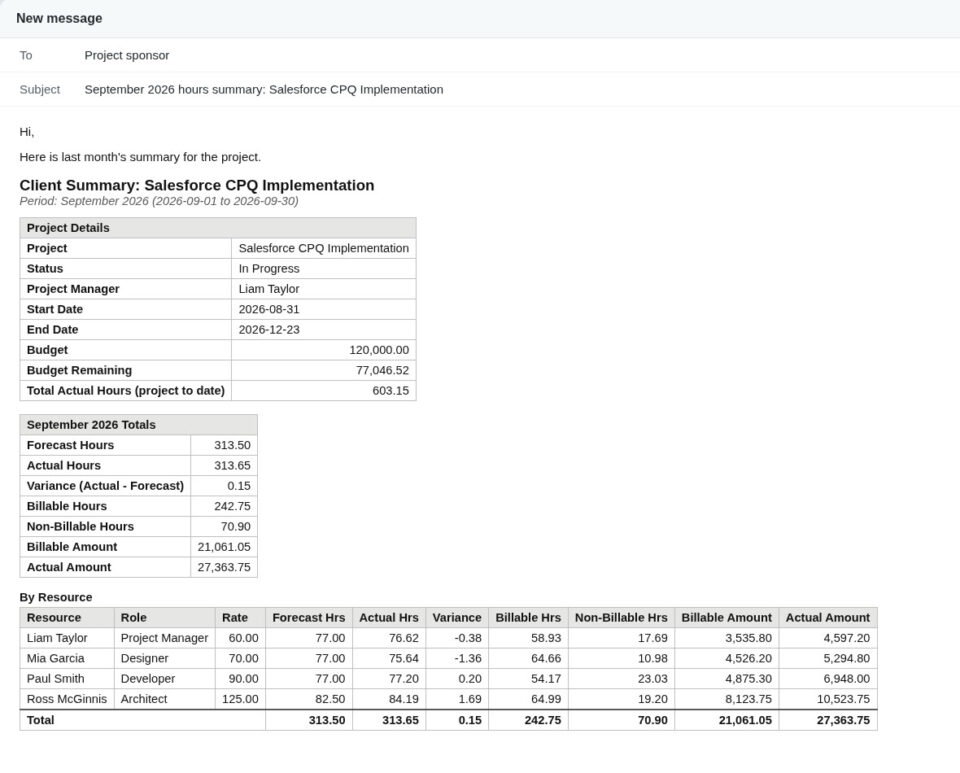
A professional services firm wanted a monthly hours statement for each client, exported to Excel. Built manually, we would estimate about 30 hours. With AI-assisted development, the full build is closer to 5. Before scoping further, we built a working demonstrator: an Export button on the project that downloads a native Excel workbook with a summary and a time detail sheet, plus a Copy button that puts the same summary into an email-ready table. It took about an hour, came with tests, and the customer had a short demo video of it the same week.
That speed changes the conversation. Instead of asking whether a request is worth a large estimate, you can see a working version first and decide from there.
For many requests, we can build a first working version while we are on an hour-long call with you. You describe what you need, watch it take shape in a test org, and leave with something you can click through and share with your team.
How we keep your org safe
Speed only matters if you can trust how the work is done. Our rules are simple:
- Only with your approval. We use AI on your work only after you have approved it. We explain how we will use it and what it will see before we start.
- Metadata, not records. The AI works from your org’s configuration (flows, fields, page layouts), never your customer or financial records.
- Read first. Every investigation starts with read-only scripts. Nothing changes in your org while we are looking.
- Built and tested in a sandbox or scratch org before anything reaches production.
What a few hours can do now
Because the work moves faster, a few service hours go further than they used to. The request you set aside because the estimate looked too big may now fit in an afternoon, and you can see a working version before you commit to the rest.
Work that once needed its own budget line now fits in a block of hours:
- A deal that staffs itself. When an opportunity closes, the project is created, the team is assigned from a template and the forecast is in place before kickoff.
- Client statements in one click. A monthly summary of hours used, hours remaining and what is billable, ready to send to each client as a spreadsheet or pasted into an email.
- A full health check of your org. Every flow, rollup and automation that touches Resource Hero reviewed, with a written report on what is working, what is drifting and what to fix first.
- A clean slate for time tracking. Years of old assignments and forecasts sorted, archived or removed, so your team sees only the work that matters this week.
Ready to put your hours to work?
Tell us what you’d like to get done. Email us at [email protected] and we’ll set up a call. Bring your request, and you may leave with a working prototype.

